Computer Network - From Notes to the Web
For a long time, my notes were just files on my hard drive—an isolated island of thoughts. I decided it was time to build a "Digital Garden," a place to publish my ideas and share them with the world.
Many people's first reaction to building a website is, "That sounds too hard, I can't code!" But today's technology is incredibly mature. I built this website without writing a single line of code. All I did was connect several powerful tools: Obsidian + GitHub + Vercel + Cloudflare. The whole process is like running a modern, fully automated restaurant.
Now, using the flowchart below, let's explore how my notes travel from my screen to yours, and decode some scary-sounding internet terms along the way.
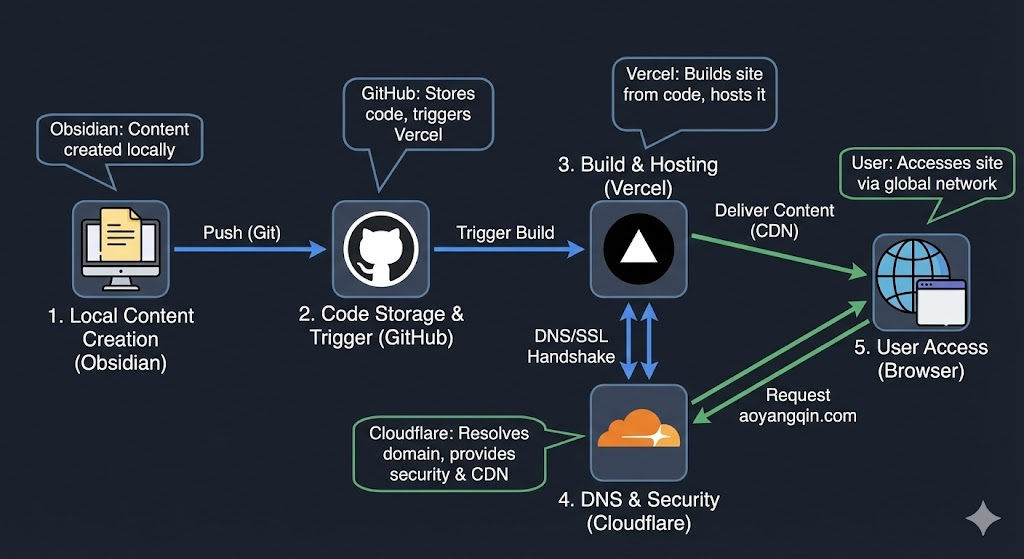
Let's break this complex-looking diagram down into five simple stages, just like running a restaurant: Prep -> Srorage -> Cooking -> Security & Directions -> Serving.
Stage 1: Prep(Local Content Creation)
Everything starts on my computer. I use Obsidian to take notes. Here, act as the head chef in the kitchen, meticulously preparing the "ingredients"—my words, ideas, and images. All of this content lives on my local hard drive, completely under my control. Once the chef has prepared a dish, it needs to be sent to the central warehouse. I can't just use a USB drive; it's slow and risky. Instead, I use Git as a "smart armored transport truck."
- When I click the publish button, I execute a Push action.
- This truck packages my new note, seals it, and securely transports it to the cloud warehouse. It's very smart—it only transports the new changes, not the entire kitchen.
- Actually, this Push action is done automatically by an Obsidian plugin called "Digital Garden."
Stage 2: Storage (Cloud Storage & Trigger)
Github is that giant cloud warehouse. Git delivers my notes here for safe keeping. But Github isn't just for storage; it's also a highly sensitive "Dispatcher".
The Github "Integration Application" constantly watches the warehouse doors. We hired a "Liaison Officier" (The Vercel Integration in Github) to watch. The moment the truck drops off new ingredients, this officer immediately picks up a special Hotline (Webhook) to call the Kitchen and shout "Start cooking!"
If you look at the Github repo setting, you will see the Vercel Integration (Github App). It acts as abridge between your code and the Vercel platform. Hidden inside this Integration is a technology called a Webhook. The Vercel App automatically registered a "listener" on your repository. When you git push your notes, the App detects the event and fires a Webhook event (an HTTP POST request) to Vercel's servers. And the Vercel receives this signal and wakes up its build servers.
Stage 3: Cooking (Build & Hosting)
Inside this Vercel kitchen lives a Head Chef named Eleventy (11ty). When the "Trigger" bell rings, Vercel runs the command npm run build which wakes up Chef Eleventy. The Chef takes my raw text files (Markdown), follows the recipe (Templates), and grills them into presentation-ready dishes (HTML). So Eleventy serves as a static site generator. It reads my Markdown files from the src folder and compiles them into a brand new folder called dist. This folder contains pure HTML, CSS, and JS files that browsers can understand.
Once the food is cooked, Chef Eleventy doesn't serve it. He places the finished dishes on the service counter. Vercel's hosting service then picks up these dishes and makes them available 24/7 on the menu. It maps the URLs to these files. For example, when you request /my-note, Vercel looks inside the dist folder and serves the my-note.html file. It also reads my vercel.json instructions to ensure the URLs look clean (e.g., hiding the .html extension).
Stage 4: Security & Directions (DNS & Security)
Now the food is ready, but how do guests find the restaurant? And how do we ensure no one poisons the food on the way to the table? Enter Cloudflare, our Concierge and Security Chief.
Guests don't know the GPS coordinates of my kitchen. They only know the restaurant name: aoyangqin.com. Cloudflare holds the city's Master Phonebook. When a guest asks "Where is aoyangqin.com?", Cloudflare instantly gives them the exact address (IP). This is DNS (Domain Name System). I configured an A Record in Cloudflare to point my domain to Vercel's IP address (76.76.21.21). Cloudflare resolves the human-readable domain into this machine-readable IP.
To ensure privacy, Cloudflare arranges a Secret Armored Tunnel for every guest. Before any food is served, Cloudflare and the guest verify each other's identity badges to ensure no spies are watching. This is the SSL/TLS Handshake. Cloudflare provides the SSL Certificate (the padlock icon 🔒 in the browser). It encrypts the connection so that the data flowing between the user and the server looks like gibberish to any hackers trying to intercept it.
Stage 5: Serving (User Access)
If my kitchen is in the USA, does a guest in Beijing have to wait for the food to be flown over? No. Cloudflare and Vercel operate a magical Global Franchise. Instead of calling the USA headquarters, Cloudflare automatically routes your order to the branch right next door to you (e.g., the Hong Kong node). This branch already has a copy of the dish ready under a heat lamp. This is the Edge Network (CDN). The moment Vercel finished "Cooking" (Building) in Stage 3, it didn't just keep the dist folder in one place. It replicated those files to hundreds of servers around the world. When you visit the site, you are downloading the HTML files from the server physically closest to you, reducing latency from 200ms to 20ms. This makes the site feel "instant."
Summary: The Journey of a Note
So, let's look at the full lifecycle of a thought:
- I think and write in Obsidian.
- Git transports the raw text to the Warehouse (GitHub).
- The App rings the bell (Webhook) to wake up the Kitchen.
- Eleventy cooks the text into HTML (Build).
- Vercel hosts the finished files.
- Cloudflare guides the user and secures the line.
- The CDN serves the content from the nearest street corner.
And all of this happens in the blink of an eye, for free. That is the power of the modern web.